FlipFinds: inventory and profit tracking for resellers
Research a possible flip, track inventory and costs, and compare estimates with recorded sales in FlipFinds for iPhone and Android.
FlipFinds helps you keep the decision to buy and the outcome of a sale in the same workflow. Use it for thrift finds, garage-sale stock, and items you list across marketplaces.
Local inventory works without creating an account. Optional Cloud uses a signed-in connection and transfers data to Cloud services. Photo backup availability and status are separate from inventory synchronization. Check Settings rather than assuming every photo is backed up.
FlipFinds supports reseller workflows; it does not automatically publish or synchronize marketplace listings. Try the free tools before installing, or review the app options.
A sourcing workflow for thrift and garage-sale finds
A low sticker price is only one part of a sourcing decision. A useful buying ceiling considers the price a comparable item might actually achieve, the cost to sell it and the cash or profit target you choose.
...
Barcode and photo-assisted entry for resellers
Barcode scanning and photo-assisted entry can reduce repetitive typing when you add an item. They start a draft; you still decide whether the identification and details match the item in your hands.
...
FlipFinds Cloud: connected inventory and backup expectations
Local inventory and connected Cloud are different ways of using FlipFinds. Local inventory can be used without creating an account. Connecting optional Cloud requires sign-in and sends supported data to Cloud services.
...
Reseller inventory tracker: know what you own
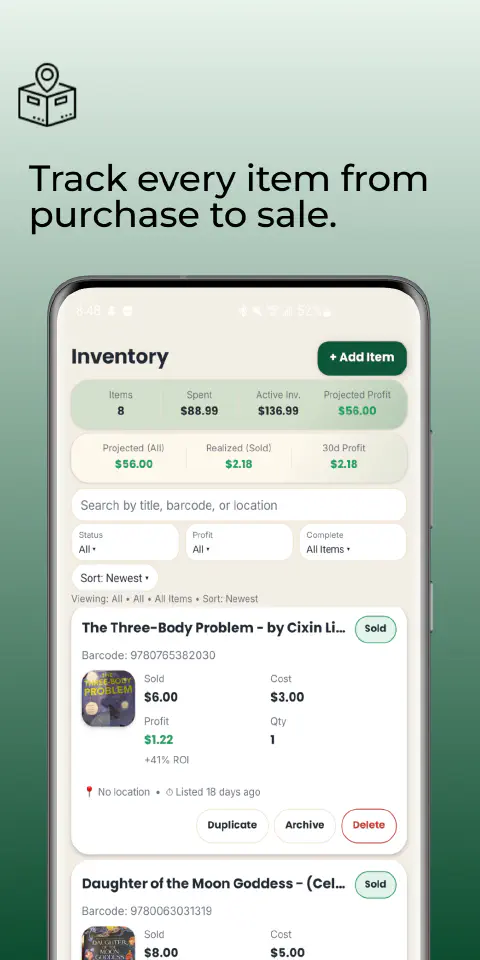
An item is easy to lose twice: once in a storage bin and again in a spreadsheet you stopped updating. FlipFinds gives you a place to keep the item record from intake through sale, even when you list on more than one marketplace.
...
Reseller profit tracking from costs to actual sales
Gross sales can rise while the money left after costs falls. FlipFinds helps you keep purchase costs and sale outcomes with the inventory behind them, then review the results in its profit and analytics screens.
...
Sold comps and active listings: a reseller research workflow
A listing price answers what a seller hopes to receive. A completed sale is stronger evidence of what a buyer paid, though it still needs context. FlipFinds supports a research workflow around the item you are adding; its eBay sold-comps action opens an external research destination.
...