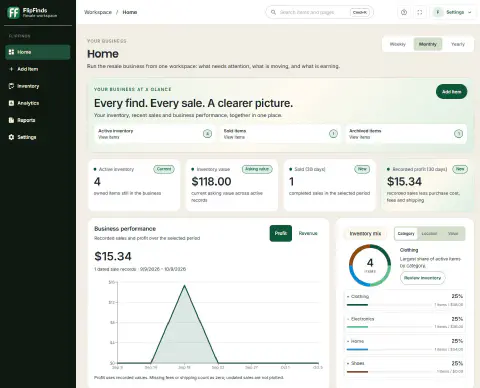
Give your resale records more room. FlipFinds Pro includes a browser dashboard for reviewing connected inventory, updating item details, exploring recorded sales and preparing reports.
From phone intake to a desktop review
- Add a find on your phone, including its cost and the details needed to identify it.
- With Pro, connect Cloud in Settings and check that inventory synchronization finishes. Check photo backup separately.
- Sign in to the desktop dashboard with the same account. Review your inventory and edit the item on a larger screen.
- After it sells, record the actual sale and applicable costs. Review Analytics and Reports using the history you have entered.
For example, a $12 item listed at $45 is still unsold inventory. Record its completed sale, fees and shipping before evaluating profit. Missing costs or a short sales history limit what a report can tell you.
What you need
| Workspace | Requirements |
|---|---|
| Local mobile inventory | iPhone or Android app; no account needed for local inventory |
| Connected desktop dashboard | Pro, a signed-in Cloud account and inventory you choose to synchronize |
Already Pro on mobile? Use the same Cloud account; a second subscription is not required. Check your existing access before purchasing again. Compare Free and Pro options for current purchase choices.
Connect your existing inventory
Signing in alone does not upload local items. Follow the desktop setup guide and verify sync status before relying on another device. Photo completion is separate from item synchronization. FlipFinds does not automatically publish or synchronize marketplace listings.
Prefer a workbook? Try the free Excel inventory template. It is a separate download and does not automatically import into the app.